Clustr maps get archived – Shock! Horror!

Anyone who puts a clustr map on their blog knows how you feel when you first see the little red dots appearing.  First up, you’re amazed that anyone is reading at all, and then you’re amazed to find that they’re coming from many different parts of the world. It’s one of the visible signs of our flattening world and our ability to connect with like minds who we’ve never physically met.

Just the other day I checked in with my Clustr map and discovered this;

large_cluster_map

‘This map will be archived on approximately 2nd Feb 2009’.

Now I knew this happened, but I didn’t know they notified you.  So I’m going to have to adapt to a blank Clustr map in the coming days. They suggest you take a screenshot for posterity’s sake. Hence the above picture.  

Ahhh well. It doesn’t matter so much to me now the accumulation of red dots, but it does act as a good talking point when you try to explain to people new to the world of blogging just what the big deal is. I’ll watch with interest over the coming days as it reverts to a blank landscape.

School’s out Friday

School will really be out for me next Friday. It’s a return to work for me next week; a dose of reality after the heady days of nothing on my agenda. Enjoy this ditty from Weird Al Yankevic as he ponders the wonder of Ebay to the tune of the Backstreet Boys ‘I want it that way’. Nearly 20 million people have viewed it already on YouTube.

Probably nice to revisit a Weird Al Yankovic effort from the past while we’re at it.   Here he is with ‘Eat it’, his parody of Michael Jackson’s ‘Beat it’.

I have to confess that I went to a Michael Jackson concert at Olympic Park here in Melbourne in the mid ’80s. It was far and away the best concert I’ve ever been to. It was at the height of Michael Jackson’s career; Thriller had been released and he was in the white glove phase. His dancing was brilliant and the show was nothing short of spectacular. Pity that 20 years on his reputation is not what it used to be.

I hope your weekend holds something special for you. Enjoy.

Kickyoutube – Easy download solution for YouTube

One of the best ways to start converting colleagues to the wonders of the Web is to introduce them to the vast array of content on YouTube that is suitable for education purposes. If you work in a school with a slow connection then you will be familiar with the circular loading indicator that can stay like that for what seems an eternity. Not conducive to good classroom practice unfortunately. By the time it loads your kids are in their next class!

Solution.  Download the video from YouTube using a conversion tool. I’ve spoken of keepvid before which has been my preferred option. This has involved me going to the keepvid site and copying and pasting the YouTube url once I’m there.

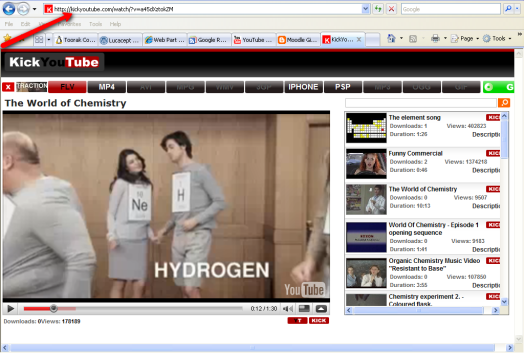
Better solutionAlec Couras, ably assisted by Melanie Gibb, alerted me on Twitter to kickyoutube. It is quite simply the easiest method I’ve seen yet to download a video to a different format. All you need to do is delete the ‘au.’  (or www.) in the url and type the word ‘kick’ in front of the word ‘youtube’  and then press enter.  Kickyoutube is enabled and you are presented with a toolbar with differing options for file conversion.  You select your preferred option and press go and your download begins. Dead simple. There are even options for conversions for the iPhone and PSP as well as the garden variety options.  Some options may not be available at the time and they will not be highlighted if that is the case.

kickyoutube1

The following screencast gives a good visual explanation of how it works;

Richard Byrne, who writes at Free Technology for Teachers, (and just quietly Richard, you are a blogging dynamo! Do you ever sleep?) has posted recently about YouTube’s new initiative with downloads. Here’s what he reported;

YouTube is introducing a download option on some videos. I haven’t seen any official announcements from YouTube, but there are some videos on YouTube that now have a small download link located just below play menu.   

This is an even easier option, but like Richard says, it’s not available for all videos at the moment. All you need to do is click on the download link and a file download to MPEG 4 format begins.

It will be nice to return to school with some new and very easy options for downloads from YouTube to share with my colleagues. We may not even need to do this with some changes that are afoot. We are moving from a 2mg internet connection to  20mg and I can’t wait to see what a difference that is going to make for our school and our connectivity. I’m expecting great things! 


Obama. A new day.

Happy January the 20th 2009
Image by m-c via Flickr

Up at 3.30 am to watch a moment in history. A great day for the world. President Barack Hussein Obama represents new hope for a challenged United States and the world.  His much anticipated Inauguration speech was impressive and delivered with consummate confidence. I particularly liked this passage;

For we know that our patchwork heritage is a strength, not a weakness. We are a nation of Christians and Muslims, Jews and Hindus – and non-believers. We are shaped by every language and culture, drawn from every end of this Earth; and because we have tasted the bitter swill of civil war and segregation, and emerged from that dark chapter stronger and more united, we cannot help but believe that the old hatreds shall someday pass; that the lines of tribe shall soon dissolve; that as the world grows smaller, our common humanity shall reveal itself; and that America must play its role in ushering in a new era of peace.

To the Muslim world, we seek a new way forward, based on mutual interest and mutual respect. To those leaders around the globe who seek to sow conflict, or blame their society’s ills on the West – know that your people will judge you on what you can build, not what you destroy. To those who cling to power through corruption and deceit and the silencing of dissent, know that you are on the wrong side of history; but that we will extend a hand if you are willing to unclench your fist.

 Let’s hope for the change this new era promises to usher in. Full text of Barack Obama’s Inaugural Address can be found at WashingtonPost.com  

Change has come to the WhiteHouse.gov. That happened very quickly; as soon as Barack Obama was announced President. Thanks to Malcolm Farnsworth for his timely updates on Twitter during the Inauguration speech.  It was very nice being able to share the moment with members of my Twitter network who were updating from the United States and various other parts of the world.

Digital Storytelling – my ‘how to’ guide.

In October 2007 I presented at the ASLA Biennial conference about my experiences with Literature Circles and Digital Storytelling.  For that conference I submitted a paper that was to go through the peer review process  for possible publication in ASLA’s Access journal. That paper was submitted in July of 2007 if my memory serves me correct. Aside from a couple of emails since then I’ve heard nothing else about it. I’m pretty sure I’ve had no communication for at least nine months.

So, if they aren’t going to publish it in their journal, I’m going to publish it in my journal, this blog. The paper outlines how I came to link Literature Circles to Digital Storytelling and the process I went through to guide my students to successful outcomes.  If a peer review process is going to take over 18 months to complete then there are serious errors with the process in my view. I would prefer readers gain the benefits of my experiences rather than have that paper and the work that went into it vanish into the ether.  

Here it is. I hope someone out there finds it of use. 

Creative use of ICT and wide reading – Literature Circles and Digital Storytelling.


Toorak College is a girl’s school (Senior Campus) in the South Eastern suburb of Mt. Eliza, Victoria. The school has a laptop program running from grade 5 and throughout the Senior School.  I began working at Toorak College in October 2005 and was impressed with the reading culture that had been established within the school and the support from the English faculty with the Wide Reading program. English classes are encouraged to schedule one lesson per 10 day cycle to visit the Library where a Teacher Librarian gives a book talk and engages our students in discussion about young adult literature.


Literature Circles (see definition figure 1.1) have been a feature of the Wide Reading program at Toorak College for some time. It is hoped that at some stage throughout the year classes will undertake a Literature Circle and participate in group discussion about a novel of their choice. As with most Literature Circle models, students take on roles and rotate these around the group.


Late 2005 I attended a VATE conference in Melbourne and had the good fortune to hear a woman by the name of Anne Burke give a presentation about Digital Storytelling. (see definition figure 1.2)  She worked for an organisation called Lab 3000 that were using Adobe Photoshop to create Digital Stories with young people and other members of the public. The examples that were shown were emotionally powerful and ignited my interest in thinking about how I could apply this use of technology to my work situation. As luck would have it I was sitting with a colleague who mentioned Literature Circles. The seed was sown!


My good fortune was rewarded again the following week. In a discussion with a colleague I was exuberantly describing Digital Stories but was lamenting the fact that Adobe Photoshop wasn’t available on our computers. She teaches Multimedia and told me she had been doing something similar with Windows Moviemaker which is part of Windows XP. She showed me an example and gave me a quick tutorial in the workings of Moviemaker. That night I made a rudimentary Digital Story about my daughter’s recent swimming carnival. Believe you me, it was rudimentary, but I felt a remarkable sense of achievement. My steep learning curve was on its way.


School holidays intervened and at the start of the 2006 school year our staff was introduced to the concept of Performance Development Projects as a part of the appraisal process. Teams were encouraged to be formed around areas of interest.  Three of our Junior School teachers found me out and we formed a group investigating how digital stories could be implemented within our school curriculum.

We realised we needed in-servicing as we were all, to use Marc Prensky’s term, digital immigrants. We organised a Windows Moviemaker in-service and two of us scheduled training about  Photo Story 3, something that was unknown to us at that stage. None of us felt entirely confident with the technology and didn’t want to launch into something blindly.


Well, that was my thinking, until a discussion with one of our English teachers launched me right into the situation I was trying to avoid. Heather was travelling to China and asked if I could run a Literature Circle with two groups of her Year 9 students during her absence. Even though I knew I wasn’t in full command of the technology, I suggested that I run the Literature Circles, but attach the task of completing a Digital Story after they had finished their reading. She was more than happy with the suggestion so I went ahead and developed a worksheet outlining what the students were expected to do. (see figure 1.3) The theme for the English unit of study that term was ‘journeys’ and the task I developed asked the students to trace the journey of a character from the novel they had studied and represent this journey as a Digital Story. Despite my reservations with my lack of knowledge about the technology, I knew this was an opportune time to introduce the concept to the students; I would have a willing audience and, if it were successful, I would be able to convince other teachers to get involved. 


With two willing Year 9 groups at my disposal we began our Literature Circles studying a variety of novels including How I Live Now,  The Running Man, Walking Naked,  The Heaven Shop,  Lord of the Flies,  Burning Eddy,  The Book of Lies and Elli.   Students were informed at the beginning of the study that a digital story would be produced. I showed them an example of a digital story and there was much anticipation regarding this stage of the project.


Fortuitously, while the students were working through their Literature Circle discussions, I was able to attend an in-service run by Microsoft on Photo Story 3 (a free download from Microsoft). This is an incredibly easy program that enables you to import still images, crop them to suit your needs, add text, customize motion to give a movie like feel to a still image, add transitions between slides and overlay narration and music. Immediately it was obvious that this would be the easy entry point for those students who would find Windows Moviemaker more difficult to manage. I returned to school and demonstrated Photo Story 3 to the students who could see its suitability for this task; many of them began to create their own photo stories about family holidays and experiences with their friends.


At this stage students were coming to me showing me images they had collected and music they were thinking about using for the task. I started to think about the copyright implications of their use of images and music. This prompted a phone call to the Copyright Council who directed me to the fact sheets they produce. In a fact sheet entitled INFORMATION SHEET G38 Music: use in student films and home videos,   I discovered this clause;


There is no general provision that allows people to copy for personal or private use. However, the Copyright Act does contain provisions which students may sometimes be able to rely on, including when they want to use music and sound recordings in films and videos they make as part of a course of study. In particular, a student may be able to deal with copyright material for research or study, provided the use is fair. An example of fair dealing for research or study may be using music in a film which is to be submitted for a school or university project, but which you do not intend to show outside the classroom or distribute further. (Australian Copyright Council p.3)


and, from INFORMATION SHEET G56 Copyright and the Internet,


Can I copy material from the Net for an assignment?


Generally, you may print and/or save material to disk if:


it is for your research or study; and


the copying is “fair” (for example, it doesn’t interfere with the legitimate market for the item). (Australian Copyright Council p.4)


This enabled me to relay to the students some important detail regarding copyright and prompted some interesting discussion. It was certainly a point of need teaching moment and had greater impact than if I were relaying this information to students in a scheduled information skills lesson.


At this stage, it was time to be there providing assistance, but to really let the students run with the development of their Digital Story.  They are the digital natives, to coin Marc Prensky’s terminology once again, and most displayed this ease with learning the workings of either Photo Story 3 or Windows Moviemaker. One of the key skills the students were trying to negotiate was the distribution of tasks and dynamics within their group. Because of the nature of the task, one laptop contained the developing project and other group members would send their image and music selection to the person whose computer was creating the Digital Story. As with any group task, some students managed this better than others. Students were finding this a really engaging task and the intrinsic motivation that fed from this led to some students whose laptops held the project working on it at home and taking more ownership of the Digital Story. Some students found this frustrating and felt their input wasn’t being recognized. It was certainly a factor and something that has had to be closely monitored in subsequent Digital Story projects.


Upon completion of the Digital Stories I organized for a sharing session whereby groups could present their finished product. This was one of the most rewarding teaching moments I have had in my years as a teacher. Not all presentations were outstanding, but I was impressed with each groups’ ability to chart the character’s journey using a combination of visual imagery, text and music. Some groups took a metaphorical approach to the task and others had a more text driven blow by blow description, but all had made genuine attempts to marry the technology with the author’s intention in the novel. Two presentations stood out; one group had read Michael Gerard Bauer’s ‘The Running Man’, and used very limited text but strong visual imagery to convey Tom Leyton’s journey.

Another group had read Meg Rosoff’s ‘How I Live Now’, and had very cleverly used a Lego character to represent the character Daisy. They included a fair bit of narrative to explain her journey, but had also used sound effects and varying musical tracks to good effect. I have to admit I became quite emotional on seeing this Digital Story for the first time. These students had identified prescient moments from the text and had produced a meaningful and moving account of Daisy’s journey in a five minute Digital Story. Our very own digital natives had achieved everything that I had envisaged was possible.


Assessing this task was another hurdle to overcome. Our English faculty has a number of rubrics for writing and speaking and listening tasks but nothing had been developed for a multimodal task like this. A rubric needed to be developed and it seemed like I was the person to do it! I wasn’t about to reinvent the wheel however. Some Internet searching showed that educators in the States had developed rubrics for Digital Stories and I looked to these for guidance. As with most rubrics, there were some good and some not so good but none that had the precise fit needed. I developed a Rubric using ideas from others but incorporating aspects that suited our requirements. (see figure 1.4)


As a final task I had the students undertake some self-assessment to gain some insight into their feelings about the task. Overwhelmingly there was a positive response, with many feeling proud of their achievement and expressing thanks for giving them the opportunity to learn how to use Photo Story 3 or Windows Moviemaker. Many of them could see the usefulness of these programs and how this knowledge could be transferred to other subject areas when it came to presentations.


We have a television in our Library, which we had been using to screen the Daily Notice information. I had the idea that this could be a forum for screening the Digital Stories that had been produced. The students were quite pleased to see their work on display for others to view, which added another dimension to the project. (This has had a springboard effect for our Library TV; we’ve seen the benefits of using this resource and now screen scanned images of new books and interesting images that we find from the Internet. It certainly provides lots of discussion and is now a focal point in the Library.)


Where has this taken us?


As I had hoped, the success of this initial foray into the world of Digital Stories sparked further interest and I have been involved in collaborative teaching with my colleagues at differing year levels. Our year 8 students developed Digital Stories that marketed their novel (similar to a film trailer) to encourage other students to read their choice. At year 10 our English students have had as their big question, What does it mean to be human? As part of this study they engaged in a Literature Circle with novels that had a Holocaust theme. I could see that the Digital Stories that would emanate from this would all take on familiar Holocaust  images so I decided in negotiation with their teacher to take a different tack. Students were asked to create a Digital Story that looked at their big question, What does it mean to be human? They had to refer to all the impetus material from their semester’s study and incorporate quotes from their Literature Circle novel. The girls found this a very challenging task but produced some excellent Digital Stories. Some of these students had been involved with the initial Digital Story exercise and to see the development of their skills was extremely encouraging.


Personally, I have found the entire process rewarding. It has helped me forge collaborative working partnerships with my colleagues and has heightened my profile within the school.  Teachers and students see me as someone with a working knowledge of technology and often seek me out for assistance. I do my best to help; I’ve learnt that to take a leap of faith can prove to be invaluable! As part of our school’s Connections program I offer the opportunity for students to learn about Photo Story 3 and Windows Moviemaker in a weekly session. I was approached by our Year 8 team to create a Moviemaker project as stimulus material for our inquiry week study on the theme of power. Additionally, I have been offered in-services and opportunities to stretch me in my understanding of technology. I’m currently involved with other teachers from my school in a research project with the AISV. We are working with Tom March and other independent schools on ICT and critical thinking skills which is proving to be very interesting.


From a Library perspective I think there have been huge benefits. The students and teaching staff identify the Library as a place where innovative use of technology is being incorporated into their studies. We, as a Library staff, have taken this on board and have recognized the need to keep up with this rapidly changing world. We have fostered an interest in Web 2.0 technologies and have developed our library intranet to meet this changing world. A library Wiki is operational and we are encouraging our students to collaborate with us in the development of this. 


Can you do this?


If I can do this, so can you! I’ve really only immersed myself in this technological world over the last two years. I strongly believe that you have to have the confidence to ‘let it go’. You don’t have to know everything about how these programs work; a basic understanding will get you through provided you are comfortable with the knowledge that your students will probably know more than you and can, in effect, become your teachers. I know that I have learnt so much from my students and I’m not embarrassed to ask, How did you do that? Can you teach me? None of them have ever looked at me in a disparaging way; they have all been more than happy to help me.


We are fortunate at Toorak College to have our students equipped with laptops making access to the technology easy. I do see these programs, however, as being a means of bridging the digital divide. Windows Moviemaker is a feature of Windows XP and Photo Story 3 is a free download from Microsoft. On Windows Vista they have incorporated Photo Story 3.1 into the package; they have obviously recognized the interest and user friendly capabilities of this program.  Having come from the State System, I could see that classes booked into computer labs or using classroom pods would be capable of creating digital stories. The use of a USB could enable the transfer of data from home to school and vice-versa. Many school libraries are equipped with computers and this could be the opportune collaborative teaching activity that could be completed in the Library. The rewards are worth the effort for both you and your students. 


References


Australian Copyright Council 2006, Information sheet G38 Music: use in student films and home videos, Australian Copyright Council, Strawberry Hills, NSW, viewed 5th July 2007, <www.copyright.org.au>


Australian Copyright Council 2004, Information sheet G56 Copyright and the Internet,  Australian Copyright Council, Strawberry Hills, NSW, viewed 5th July 2007, <www.copyright.org.au>


Daniels, Harvey 1994, Literature Circles: Voice and Choice in the Student-Centered

Classroom, Stenhouse Publishers, York, Maine p.13  


Keller,Colleen 2007, 7 things you should know about Digital Storytelling, Educauseconnect, viewed 17th July 2007, <http://connect.educause.edu/library/abstract/7thingsyoushouldknow/39398 


Prensky, Marc 2001, Digital Natives, Digital Immigrants, viewed 3rd July 2007, <http://www.marcprensky.com/> 


(Sorry for any formatting issues that appear here. I’ve tried to fix it to no avail!)
 

Nina’s Arena – visit if you can

My friend Nina and I have been walking together for the last six years or so. We’ve been getting up early over this holiday break and walking 5kms nearly every day. I think it’s making a difference for us, but I know it’s making a difference for my dog Bella who has shed some of her bulk and is now sporting a waist!   

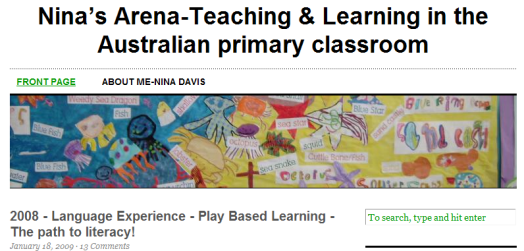
Nina has been listening over the last year as I’ve discussed with her this blog and the effect it’s had on my life. The listening has paid dividends, as now Nina has entered the edublogosphere with her own blog, Nina’s Arena – Teaching and learning in the Australian primary classroom.  Last night I sent out a tweet asking people to visit and today I note that she has had 108 hits. 108! On a first post! Now I’m not going to claim they are all direct from Twitter but quite a few of them would have been. That’s pretty impressive from the network showing support for a new blogger. 

ninas_blog

Nina is writing about her experiences as an early years teacher. Here’s some of what she says;

My blog is about sharing PD, my classroom program, planning, ideas and a resource for teachers who often ask me for ideas. Last year, I had teachers visit my room so I put together a list of ‘things’ I felt were crucial to my program.  I am a teacher at Kunyung Primary (see about me) and will be teaching Prep again this year. Kunyung is moving into the International Baccalaureate: Primary Years Program and as the Level 1 coordinator (I’ll keep you posted) I’m very excited about my school’s future.   

I’m pretty excited about Nina’s entry into this world. This morning as we walked she was saying how amazing it is that there are educators willing to share and encourage others. It is amazing. Sometimes in our own schools we may find a few others who share our enthusiasm for learning and sharing. Unfortunately we also find those who don’t want to take on new ideas and think that the way they’ve always done things is going to be sufficient. It’s reassuring when you find others who share your passion and want to make inroads into new territory for the students we teach.    

Venture over to Nina’s blog and offer some encouraging words. It ‘s always good to hear new voices; they help to extend our learning and move us in new directions.

Google Notebook facing the chop

Google have announced that they are going to stop offering some services  that are useful for education. One of these is Google Notebook. Here’s what Techcrunch have reported;

Google Notebook will continue to function for current users, but will no longer accept new ones. However, existing users won’t be able to use the browser extension, which makes the service significantly less useful. Among Google’s suggestions for replacements are SearchWiki, Google Docs, Tasks (Gmail), and Google Bookmarks.

Personally, I think this is a great shame. I had planned to introduce many of my students to Google Notebook this coming school year. I have found it invaluable for collecting snippets from the web for future reference purposes and think it is highly useful for student research.  I’m going to have to spend some time investigating  Zoho Notebook as an alternative.  I’ve yet to use it but have heard good reports.  YouTube have explanatory videos exploring how to use Zoho notebook so these will be essential viewing in order to figure things out.

What I liked about Google Notebook was that it fitted seamslessly into my useage of Google products. I enjoy using Google Reader and Docs and Notebook accompanied these very well. I’ve left a comment on their official blog (along with 531 others!) imploring them to reconsider. Perhaps you can too – there is strength in numbers!  

Google have also decided to cease uploads to Google Video (this will take effect in a few months). It will serve an archive purpose as you will still be able to view content stored there. This decision is not so surprising considering Google’s purchase of YouTube in 2006 and the popularity of this site.

What’s next for Google and the services they offer? Will Knol face the chopping block too. It’s hardly set the world on fire.  I’ve been reading that Microsoft and Yahoo are entering talks again re the possibilty of merger. Perhaps the threat of serious competition should this ever happen will see turnarounds in the Google camp.  Interesting times we live in!

*Update – Here’s a good link to a lifehacker article recommending Evernote as an alternative. I signed up to Evernote awhile ago so will have to spend more time learning how it operates.

School’s out Friday

This is Hector Projector’s ‘It’s art’. (Hectornado on YouTube) who has created this hand drawn stop motion animation to his original composition. He represents talent and initiative in my opinion. He’s a guy living in Sweden, who, with the help of myspace and YouTube, is managing to carve out a name for himself and his creative talents.

Great, isn’t it. This is what is possible for the students we teach. Our schools need to start recognising that we can assist our students to showcase their talents and use this media to create a positive digital footprint for themselves (and quite possibly a future career for themselves as well).  

It’s inspiring to see young people using social media to good effect.  Almost makes me excited about the prospect of returning to school soon. I did say almost. I have to admit that I am enjoying the downtime holidays afford!

Have a great weekend. Forecast is for sunny weather here in Melbourne and I intend to soak it up.

YouTube into Powerpoint – Wikihow has advice

I have never successfully been able to get a YouTube .flv video to play in a PowerPoint presentation. We have a Library PowerPoint that runs through a large television and we have often wanted to embed videos from YouTube into this. Our workaround has been to use a converter like keepvid to shift it from .flv format to .avi format so that they will play in PowerPoint.   

I followed a link tonight from Dai Barnes onTwitter that took me to an article from the School Library Journal written by Joyce Valenza.  It was called, ‘When YouTube is blocked (eight ways around)’ and is worth reading if you work in schools facing problems accessing YouTube. One of the links had me intrigued re the PowerPoint solution and I ended up at ‘wikiHow  – The How-to Manual that you can edit’.  The article in question was called, How to Embed YouTube Flash Videos in Your PowerPoint Presentations‘  and step by step instructions were provided. I haven’t tested them as yet, but come my return to work I’m sure I’ll be putting them to good use! According to instructions at the bottom of the page you can embed the article in its entirity into your blog. Their creative commons licence makes them very generous. Hence, the following; 


How to Embed YouTube Flash Videos in Your PowerPoint Presentations

from wikiHow – The How to Manual That You Can Edit

YouTube is considered to be one of the world’s most popular online community. YouTube is known for its fast video download rate, making it the number one choice for presenters when it comes to the video aspect of their presentations.

Steps

Play YouTube Flash Video Online in PowerPoint with Internet Access

  1. In PowerPoint 2003 and earlier versions, go to View -> Toolbars -> select “Control Toolbox”. In PowerPoint 2007, go to PowerPoint Options -> Popular -> tick “Show Developer tab in the Ribbon”.
  2. In the Control Toolbox, click the last icon “More Controls” which is displayed as hammer plus wrench. In the set of controls available on your computer, select “Shockwave Flash Object”. Then use your mouse to draw and resize an area in the slide as you like to place your YouTube video.
  3. Go to the YouTube video page you’d like to add, and check the URL in the address bar of your Web browser. You’ll get an address like http://www.youtube.com/watch?v=hChq5drjQl4 Change the phrase watch?v= to v/, and now the address become http://www.youtube.com/v/hChq5drjQl4
  4. Right click the area you drew which is displayed as a big cross, select Properties and go to Properties tab. Copy and paste the YouTube video address in the field as value of attribute Movie; set the value of attribute Playing and Loop to False. Close the Properties tab when everything is done.

Get YouTube Flash Video Offline and Add To Presentations
When you don’t like the live YouTube video way, which requires live and reliable Internet connection, you may download YouTube video to your hard drive, and insert the video into presentation offline. It’s also very easy to make in a few minutes.

  1. Go to the YouTube video page you’d like to add, and check the URL in the address bar of your Web browser. You’ll get an address like http://www.youtube.com/watch?v=hChq5drjQl4. Then try some online services like KeepVid or other offline tools to retrieve and download the original Flash video file from the address. Rename the downloaded YouTube Flash video file from “get_video” to “xxx.flv” as you like in FLV format.
  2. Now you need to decide in which format of YouTube Flash video you’d like to add in PowerPoint presentation. If directly inserting the Flash video in FLV format, you have to ensure the FLV file could be properly played back at first. It’s recommended to install VideoLAN VLC media player to play YouTube Flash video files in FLV format.
  1. Find the hidden Control Toolbox out in PowerPoint and go to “More Controls” as the way in the first steps of online YouTube section above. Select “VideoLAN VLC ActiveX Plugin v1/v2” in the set of controls available, then draw and resize the displayed area with mouse in the slide as you like. Right click the area you drew and go to Properties tab, and complete the value of attribute “MRL” with the path of the YouTube Flash video file, like D:\Temp\2008\temp.flv, then close the tab. Now the YouTube Flash video in your hard drive is ready to play in the presentation.

— Insert YouTube Video As Common Video

Besides, you may also try to convert your YouTube Flash video in FLV format to other common video format like AVI, MOV, etc with some online services such as vixy.net or other offline video conversion tools. Then you can directly insert these converted video in your hard drive via “Insert Movie from File” in PowerPoint.

— Insert YouTube Video As SWF Flash Movie

Generally speaking, to avoid video codec problem with different computers, and ensure the properly video playback in PowerPoint, Flash video in FLV format and other video formats is not recommended to be inserted in PowerPoint. Based on the popularity of Adobe Flash player, which is widely installed on most computers in the world, Flash movie in SWF is highly compatible cross-platform and properly played back. You may try some video to Flash conversion tools, such as WebVideo Author, to convert FLV or other video formats to SWF format.
The Flash movie file in SWF format could be inserted into PowerPoint presentation as “Shockwave Flash Object” in Contorl Toolbox like the way in the first steps of online YouTube section above. And you can embed the SWF Flash file in your presentation through setting the attribute “EmbedMovie” to True in Properties tab.
By the way, some presentation authoring tools, such as PPT2Flash Professional (http://www.sameshow.com/powerpoint-to-flash-pro.html), Articulate Presenter, offer the shortcut to insert SWF Flash files quickly, and finally output the PowerPoint presentation with YouTube Flash video as Flash movie in SWF format. Flash-based presentation is kind of great solution to avoid compatibility issues from video codec, PowerPoint versions and operating systems, and easy to make Web compliance.
Maybe the total guide for YouTube video in PowerPoint is a little of complicated for everyone. Google’s PowerPoint killer in Google Docs is highly expected to add the feature to add YouTube video in online presentation instantly, if Google really wants to be the killer. After all, YouTube is a great video treasure for everyone, we can make better use of it with our works and life.

Related wikiHows

Article provided by wikiHow, a wiki how-to manual. Please edit this article and find author credits at the original wikiHow article on How to Embed YouTube Flash Videos in Your PowerPoint Presentations. All content on wikiHow can be shared under a Creative Commons license.

(The grammar in the final paragraph suggests English is not the native language of the contributor. What is wonderful is that people are willing to share their knowledge across language barriers.)

A year ago today……..

stairs to zen
Image by julkastro via Flickr

It was a year ago today that I first put fingers to keypad and started to write this blog.  So much has happened since then it seems like two years rather than just one. Then I was interested, now I am connected.

Being connected means that I am always learning and consequently, I seem to be so much busier. There is just so much to do, but all of it is interesting and I don’t want to stop. But I do need to take stock. I was reading Garr Reynold’s blog today and once again found the aura of calm that encapsulates his writing. You do need to visit Presentation Zen and be swept away by the ideas that Garr presents. I feel so lucky to have crossed paths with him on this 12 month journey. He is a man with much to offer.  

Garr’s blog post from January 10th talks of the lessons he has learnt from Jazz and Zen. Lessons he has been able to apply to life. I can relate and intend to refer to this list often in the coming year. Maybe you can too.

Twenty-one things I’ve learned from jazz and Zen
  1. In structure there is freedom and spontaneity.
  2. Restraints and limitations can be great liberators.
  3. Don’t ever force it; be ever natural.
  4. Good intentions are key. Sincerity is king, and yet…
  5. It’s not about you.
  6. Listen more than speak.
  7. Speak only when you have something to say, and then in the most economic way possible. 
  8. Your approach can be direct and subtle at the same time.
  9. Fear is natural (and human), but work through it and past it. Don’t let fear hold you back.
  10. Mistakes are part of it (do not worrying about them).
  11. Embrace the power of now, this moment.
  12. Technique matters, but it’s not the most important element.
  13. Make no pretenses; put up no facades. 
  14. Laugh, smile if you feel like it — why not?
  15. Share yourself with others; make a contribution.
  16. Simplicity is supremely beautiful, yet difficult to obtain.
  17. Emptiness and silence are powerful elements of expression.
  18. Remove the clutter, strive for absolute clarity.
  19. If you think you have mastered it, you’ve have already begun your descent.
  20. Always be learning. Always be learning. Always be learning.
  21. Curiosity is your greatest gift, nurture it (in yourself and in others)
Reblog this post [with Zemanta]