What’s in a name?

The name of a man is a numbing blow from which he never recovers.

Marshall McLuhan

Eric Schmidt, CEO of Google, recently made a some very interesting comments while being interviewed by Holman W Jenkins from the Wall Street Journal;

“I don’t believe society understands what happens when everything is available, knowable and recorded by everyone all the time,” he says. He predicts, apparently seriously, that every young person one day will be entitled automatically to change his or her name on reaching adulthood in order to disown youthful hijinks stored on their friends’ social media sites.

Danah Boyd’s response to this is equally interesting, if not moreso;

This is ludicrous on many accounts. First, it completely contradicts historical legal trajectories where name changes have become increasingly more difficult. Second, it fails to account for the tensions between positive and negative reputation. Third, it would be so exceedingly ineffective as to be just outright absurd.

Surprisingly, I spend quite a bit of time discussing things like this with prospective parents at my school. Our school registrar tours with them and visits me often. I talk about the vision of our new library under construction, the work we are doing at Year 9 using Ning as a virtual learning community and our efforts with Cybersafety. Parents are really interested in this last point, and I see many nodding heads when I discuss the need for our students to establish a positive digital footprint for themselves. Plenty of them realise their kids use sites like Facebook as their communication platform, but they do want them to do so with some understanding of how they conduct themselves responsibly to protect their own reputation, and the reputation of others.

Jonathan Zittrain discusses a similar idea to that raised by Eric Schmidt, but he calls it ‘Reputation Bankruptcy’. It’s the idea that you will be able to wipe your digital identity slate clean and start over. Who knows, one day it just might be possible, but what if you have a good deal of positive web content that you don’t want erased? Will we be able to be selective about what stays and what goes?

Danah makes another very good point in her post responding to Eric Schmidt’s comments;

All it takes is for someone who’s motivated to make a link between the two and any attempt to walk away from your past vanishes in an instant. Search definitely makes a mess out of people’s name-based reputation but a name change doesn’t fix it if someone’s intent on connecting the two.

So, what’s in a name?  Will we need to grapple with our digital identities, identities that can be forged by our friends (or enemies!) as much as they are forged by our own hand? Once again, we need to take this on board as educators. We need to help our students understand that they can create the long tail of good searchable content that will make their name a blessing, not a burden.

“What’s in a name? That which we call a rose
By any other name would smell as sweet.”
Romeo and Juliet (II, ii, 1-2)
Real time search – Google launch today

Just last night I wrote about why a company like Google would be interested in the real time search offered by services like Twitter. Today they launched just that. Now when you receive search results, at the top of your results will appear real time feeds from Twitter, friendfeedand Yahoo answers. Apparently they are planning to incorporate updates from public Facebook and myspace pages too.

Fascinating. The world is moving pretty fast folks. Is education responding fast enough? How many teachers out there are aware of impending change and its impact on the way we do things?

Google Wave – initial impressions

I’ve been playing around with Google Wave for a few days now,  trying to work out what it can offer us as a new vehicle for communication. My initial impression is that it is real time email. If you are online at the same time as participants in a Wave you can use it like an instant messaging service. To improve your functionality you really need to install Google Gears. (thanks Richard for enlightening me about this!)  I didn’t have this installed and found that I wasn’t able to embed Youtube videos or drag and drop pictures into the Wave. Once Google Gears was installed I was able to do a lot more.

It really only makes sense if you are using it with someone else. Trying it out by yourself is pretty unexciting. You need to be able to see what can happen when there are others working with you. Collaboration is what Google Wave is going to be useful for and I can see a use for it for students and staff. The Gravity gadget that has been developed by SAP Research in Queensland offers some insight into how business will use this tool. You can easily apply this type of scenario to school based staff and student collaborative use.

I’m by no means an expert on Google Wave, but there are some features about it that I like. Embedding videos and dragging and dropping pictures is easy and they are going to enable you to do the same with Google Docs. I’m keen to have a go at using Rosy, the translation feature, but first I have to figure out how to get it added to my contacts so I can drag it into a conversation when it is needed. (I think that’s how it works anyway!!) Then I have to find a non English speaking Wave user to see if Rosy translates conversations as effectively as it promises to do. If it did, it would be a huge breakthrough for communication with classrooms that previously had been inaccessable due to language constraints.

Take a look at the video I made to show you what it’s like. It’s not brilliant, and you’ll probably need headphones to hear the commentary, but it will give you some idea of what a Wave is like. (I made it in a hurry last night!)

Daniel Tenner has written a good post; What problems does Google Wave solve? Worth a read.

Google Wave explained

Like thousands of others, I was waiting for a Google Wave invite, but none arrived. Even publicly begging for one on Twitter didn’t do me any good. Here’s hoping I will get one eventually, because it does look really interesting. The above video explains what Google Wave is and what it can do. The people explaining it are developers from Google and I think they do a pretty good job explaining it in a way that most would understand.

Epipheo Studios created the above cool little video that is doing the rounds as well as a means of explanation of Google Wave. I wonder if they have got their invite yet considering they have had over 200,000 views of this on YouTube! They are most definitely helping Google out in terms of promotion.

Waiting to join the wave. In the shallows right now. Not even close to catching one I bet!

Just think about it…

Just think about it……….

1o years ago, if I wanted to find out about Biston Betularia and Industrial Melanism I would have had to venture to my local library, search the  catalogue and hope that a book they had contained some information about what it is. My best bet may have been the hard copy of World Book or Encyclopedia Brittanica.  

Last night, after seeing a tweet from factlets about the Peppered Moth in England, I had cause to consider the speed at which you can acquire information these days. Jo Hart, from Perth, replied to my tweet with this;

Biston betularia and industrial melanism – thnq Jenny you just took me back to my younger self at uni   

Now I’d never heard of Biston Betularia and Industrial Melanism, but a quick Google search led me to a page of results  (with 3,100 results) for me to peruse.  Quite quickly I’d ascertained it’s origins and how the Peppered Moth was the best-studied example of this. If I had have visited Mahalo, I would have discovered a page listing images, video and results from Twitter. Right now if you visit this page you’ll see Jo’s reply to me listed in the Twitter results. Now that is cool!

I recounted this story to a work colleague today and we both marvelled at the rapidity of information retrieval today. Even though this is commonplace now, it still holds me in awe of the power of internet based search.  It makes me look at our non-fiction collection and question why we invest considerable dollars purchasing slim tomes for $40.00 a pop that may languish there untouched for years. It’s particularly relevant to question this when you work in a 1:1 environment (that means all of your students have laptops). I’ve said it before, the students at my school look to the internet first for information before they would think of venturing to the shelves. When I think of my practice now, I’m the same. It has certainly evolved from when I first started teaching  at Toorak College nearly 4 yrs ago.

Now, to think about what search might be like 10 years from now?……..

Google Translate- is this changing the nature of LOTE teaching?

LONDON - APRIL 13:  (FILE PHOTO) In this photo...
Image by Getty Images via Daylife

I was involved in a session the other day with Yr 9 students. We were exploring techniques for searching the web to find the information you need. We spent some time looking at Google Scholar and this led to an exploration of some of the other applications Google offers. When we touched on Google Translate you could see this ‘look’ appear on the students’ faces. It was like I’d uncovered their hidden secret.  

What emerged quite clearly was that the students were using Google Translate to assist them with their LOTE classes. Obviously they were under the impression that the teaching staff weren’t tuned into the wonders of Google Translate and all it offers.

If you haven’t used it yet, you should check Google Translate out. I’ve had to use it recently when I had comments in Russian left on this blog. I thought they might have been Russian spammers, but they were legitimate comments.  It helped that I work with a Russian colleague who was able to verify that the returns I was getting from Google Translate were close to the mark. I can only imagine that the students at my school have discovered this as a pretty effective tool for handling homework easily. I’m just left wondering whether the LOTE staff are onto it.

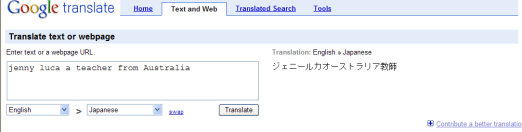
If they’re not, they should be, and so should all the LOTE teachers out there. Hopefully people are finding ways to make it an effective tool to support the learning of students. All you need to do is place text into a box, select the language you want to translate to and hit enter. Check out the screenshot below.  

Google_Translate

Using it has made me think about travel and how handy Google Translate would be if you were overseas and had an internet enabled phone. You could use this as your translation tool to navigate your way through  non- English speaking countries. I know that when Iwas in Shanghai by myself last year, I had moments where I felt completely vulnerable due to my inability to communicate.  Google translate would have been a  lifesaver, especially for those moments when I was trying to hail Taxis and have them take me to my hotel when all I had was the hotel name written in English. You can imagine the difficulties I had. All I can say is, you live and learn!  

Interestingly enough, it’s made me consider the Tower of Babel story from Genesis. When I was in my first year of Teacher’s College,  I had to write a 3000 word essay about the perception of God based on the Book of Genesis.  I had enormous difficulty finding references as I was presenting  the viewpoint that God had it in for man. I literally had to hole myself up in the State Library of Victoria for a period of time, as the only book I could find that went anywhere near supporting my viewpoint was one by Erich Fromm that was only housed there. 

How do I bring this anecdote to my discussion of Google Translate?

It’s a leveller. It enables collaboration across cultures distanced by language. And unless the almighty disables the internet to divide mankind, the use of a tool like this will help to faciliate the  abilty of cultures to work together to communicate and maybe, just maybe, work together to solve the problems that plague this planet.

In the meantime, LOTE teachers, get yourselves up to speed. The kids you teach might be just one step ahead of you. 


Reblog this post [with Zemanta]

Google and the Future of Books – Robert Darnton’s must read article

Google Book Search car
Image by clarissa~ via Flickr


 If you are at all interested in the future of books and the digitising of collections you must read Robert Darnton‘s article ‘Google and the Future of Books’ written for ‘The New York Review of Books‘. In it he discusses the efforts by Google to digitise millions of books from the collections of research libraries to enable these texts to be searched online. If my reading of the article is correct, Google has recently settled a lawsuit with authors and publishers who were suing for alleged violation of their copyright due to the digitisation of their work. The settlement that has been reached entails the following (I’m taking the liberty of quoting Robert’s words at length here. I can see no better way to explain the decision and its ramifications);

The settlement creates an enterprise known as the Book Rights Registry to represent the interests of the copyright holders. Google will sell access to a gigantic data bank composed primarily of copyrighted, out-of-print books digitized from the research libraries. Colleges, universities, and other organizations will be able to subscribe by paying for an “institutional license” providing access to the data bank. A “public access license” will make this material available to public libraries, where Google will provide free viewing of the digitized books on one computer terminal. And individuals also will be able to access and print out digitized versions of the books by purchasing a “consumer license” from Google, which will cooperate with the registry for the distribution of all the revenue to copyright holders. Google will retain 37 percent, and the registry will distribute 63 percent among the rightsholders.

Meanwhile, Google will continue to make books in the public domain available for users to read, download, and print, free of charge. Of the seven million books that Google reportedly had digitized by November 2008, one million are works in the public domain; one million are in copyright and in print; and five million are in copyright but out of print. It is this last category that will furnish the bulk of the books to be made available through the institutional license.

Many of the in-copyright and in-print books will not be available in the data bank unless the copyright owners opt to include them. They will continue to be sold in the normal fashion as printed books and also could be marketed to individual customers as digitized copies, accessible through the consumer license for downloading and reading, perhaps eventually on e-book readers such as Amazon’s Kindle.

While this represents availabilty of knowledge on an unprecedented scale at what may be a reasonable cost, it also represents the kind of monopoly by a business of an unprecedented scale with the  product being knowledge. And this is where Libraries have missed the boat. As Robert refers to in the article, the opportunity was there to realise the Alexandrian library dream and create a National (international, really) Digital Library with access based on reasonable fees for all. The challenge exists now for Google to not put profit before the public good and ensure that they realise the dream and not destroy it with eagerness for shareholder and company profit.

Robert speaks of what this decision means for Google’s stakehold in all our lives; 

“….the settlement creates a fundamental change in the digital world by consolidating power in the hands of one company. Apart from Wikipedia, Google already controls the means of access to information online for most Americans, whether they want to find out about people, goods, places, or almost anything. In addition to the original “Big Google,” we have Google Earth, Google Maps, Google Images, Google Labs, Google Finance, Google Arts, Google Food, Google Sports, Google Health, Google Checkout, Google Alerts, and many more Google enterprises on the way. Now Google Book Search promises to create the largest library and the largest book business that have ever existed.”

It’s not just Americans feeling the effect of Google Robert, it’s a worldwide phenomenum. I love much of what this company is doing to enable access and delivery of information, but we have to keep in mind that they are a business and not a philanthropic institution. There is the possibility of the stranglehold having an effect on access if the costs they charge get too high. It will be up to us all to keep them in check.  

Please click the link and read the article for yourself. There is so much in it for consideration and there is no way I have done it full justice here.  


Reblog this post [with Zemanta]

Google Notebook facing the chop

Google have announced that they are going to stop offering some services  that are useful for education. One of these is Google Notebook. Here’s what Techcrunch have reported;

Google Notebook will continue to function for current users, but will no longer accept new ones. However, existing users won’t be able to use the browser extension, which makes the service significantly less useful. Among Google’s suggestions for replacements are SearchWiki, Google Docs, Tasks (Gmail), and Google Bookmarks.

Personally, I think this is a great shame. I had planned to introduce many of my students to Google Notebook this coming school year. I have found it invaluable for collecting snippets from the web for future reference purposes and think it is highly useful for student research.  I’m going to have to spend some time investigating  Zoho Notebook as an alternative.  I’ve yet to use it but have heard good reports.  YouTube have explanatory videos exploring how to use Zoho notebook so these will be essential viewing in order to figure things out.

What I liked about Google Notebook was that it fitted seamslessly into my useage of Google products. I enjoy using Google Reader and Docs and Notebook accompanied these very well. I’ve left a comment on their official blog (along with 531 others!) imploring them to reconsider. Perhaps you can too – there is strength in numbers!  

Google have also decided to cease uploads to Google Video (this will take effect in a few months). It will serve an archive purpose as you will still be able to view content stored there. This decision is not so surprising considering Google’s purchase of YouTube in 2006 and the popularity of this site.

What’s next for Google and the services they offer? Will Knol face the chopping block too. It’s hardly set the world on fire.  I’ve been reading that Microsoft and Yahoo are entering talks again re the possibilty of merger. Perhaps the threat of serious competition should this ever happen will see turnarounds in the Google camp.  Interesting times we live in!

*Update – Here’s a good link to a lifehacker article recommending Evernote as an alternative. I signed up to Evernote awhile ago so will have to spend more time learning how it operates.

Google things to do.

I have to admit to really liking the services Google offers. I love Google Docs and the flexibility they offer for working collaboratively and for storing documents online. I still find myself defaulting to Google as my search engine of choice even though I know there are other search engines doing a great job delivering results in interesting ways. Phil Bradley referred to this page on the Google site in a post recently and I found it pretty cool. It’s called Google things to do.


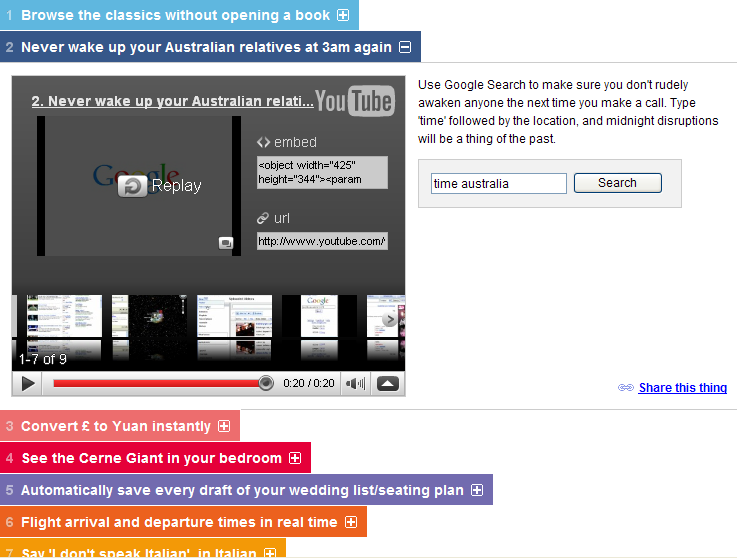
On the page are 52 things to do. They include ‘Watch your favourite YouTube clips in high resolution’, ‘Make your homepage YOUR homepage’, ‘Read a newspaper written in a language you don’t speak’, and there are 49 others for you to check out. What you do is click on the title of the thing to do and you will find a prompt redirecting you to YouTube video or one will appear in the text box on the page. Other options include a Google search box pop up that enables you to search for the answer to life, the universe and everything.

I think this would be fun to use with kids, provided you weren’t hampered by a firewall blocking YouTube!! Imagine setting the task to find a new thing to learn and present back to their peers after a set period of time to demonstrate what they’ve learnt. I think I’d find that a pretty interesting lesson. Just wish the firewall didn’t exist so that I could actually do it with the kids I teach.